
We have all been there. It is 10 PM on a Tuesday, and you are staring at an algebra problem that makes absolutely no sense. Your phone is right there, and taking a quick picture with an AI math solver with steps feels like the perfect lifeline. According to research from the Center for Democracy & Technology, nearly half of students now use AI tools for schoolwork. You write down the final answer, copy the steps exactly as they appear on your screen, and finally go to sleep.
But the next day, your teacher hands back your paper with a giant red circle around your perfectly correct answer. You get zero credit, and worse, your teacher wants to speak with you after class.
This is the homework panic that millions of students face today. Students are terrified of getting zero credit or being falsely accused of cheating because they used an app to get unstuck, only for that app to spit out robotic, overly complex steps that a teacher immediately flagged as suspicious. Meanwhile, parents feel helpless. They want their kids to learn and succeed, but traditional apps just hand over answers without teaching the grade-appropriate methodology.
Using AI to learn is a smart, modern study strategy. However, blindly copying robotic steps is a recipe for academic trouble. In this guide, we will explore exactly how teachers spot AI-generated homework, why legacy solvers often give you the wrong method, and how to use a math homework helper ethically to build real understanding.
Can Teachers Tell If You Use Photomath or Mathway?
The short answer is yes. Experienced teachers can almost always tell when a student uses a legacy math solver to complete their assignments.
Teachers spend hours every week reviewing student work. They know their students' baseline abilities, their typical handwriting patterns, and the specific mistakes they tend to make. When a student who usually struggles with basic fractions suddenly submits a flawlessly executed, ten-step polynomial equation using advanced notation, it sets off immediate red flags.
Furthermore, educators are now actively trained to look for AI-generated homework. According to faculty guidelines from Glendale Community College, instructors are specifically advised to monitor students for signs of using apps that solve math problems and show work. They are instructed to report academic integrity incidents when the process does not match the student's known capabilities.
The Robotic Steps Giveaway
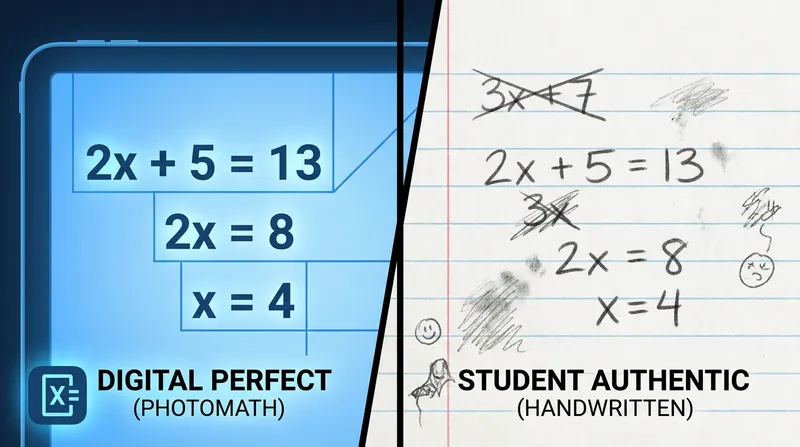
One of the biggest giveaways of AI-generated work is what educators call "robotic steps." When you use a generic step-by-step math solver, the output is perfectly formatted. It moves from point A to point B with absolute, flawless logic. It never makes a minor arithmetic error, it never crosses out a mistake, and it never skips a formal notation step.
Real student work is rarely this linear. Authentic human work is a bit messy. It includes crossed-out numbers, calculations scribbled in the margins, and logical jumps that reflect how a human brain actually processes information. When you submit a paper that looks like it was printed from a computer, your teacher will notice. If you want to understand how to use these tools properly for complex subjects, check out our guide on How to Use an AI Geometry Solver for Step-by-Step Proofs (Without Cheating).
The Wrong Method Problem: Calculus in Middle School
The most glaring technical flaw of older math apps is that they are designed to find the most mathematically efficient path to an answer. They do not know if you are in 8th grade or college.
For example, if you ask an older app to find the vertex of a parabola, it might use a complex calculus derivative to solve it. If you are in a middle school algebra class, your teacher expects you to use a simple formula like -b/(2a). Research published by Edutopia highlights that generic solvers often fail to produce step-by-step arguments that reflect classroom instruction, eliminating critical thinking in the process. When you write down calculus steps for an algebra assignment, you are experiencing the "Photomath wrong method" problem, and it is a guaranteed way to get caught. For more on this, read our breakdown on Box Method, FOIL, or Grouping? Why Single-Solution Math Apps Confuse Students.
Is Photomath Cheating? When to Use AI Math Help
The ethical question of whether using a math solver is cheating depends entirely on how you use it. Schools care about the journey to the answer, not just the final number.
Ethical Use Cases:
- Checking your finished homework for accuracy.
- Finding the specific step where your logic went wrong.
- Learning a new concept when you are stuck at home.
Academic Dishonesty:
- Submitting generated steps as your own original cognitive work.
- Copying methods you have not learned in class.
A clear example comes from Miami University, which explicitly warns students that using solution-based math solvers is an academic integrity violation because the generated process does not reflect the student's own work. If you are a parent worried about navigating this new landscape, our article 'It's Ruining My Class': A Parent's Guide to AI Homework Cheating & Photomath Alternatives offers great insights.
Why Traditional Math Solvers Fail to Teach You
Beyond the risk of getting caught, there is a bigger problem with copying answers: it robs you of the learning process. In education, there is a concept called "productive struggle," which is widely recognized by organizations like the American Psychological Association. This refers to the mental effort your brain goes through when trying to solve a difficult problem.
Experts at Third Space Learning note that while students can get a 100% on math homework tasks using instant solvers, they often learn nothing because the tools bypass this productive struggle. Getting the answer quickly feels good in the moment, but it does not build the neural pathways you need to succeed. When test day arrives and your phone is put away in your backpack, the lack of real understanding will show in your grade. You need a math solver that shows work while actually acting as a tutor, not just an answer generator.
How to Use AI Math Help as a True Learning Tool
So, how do you use an AI math solver with steps without crossing the line into cheating? The secret is translating the digital help you receive into authentic understanding. You must prove to yourself and your teacher that you understand the mechanics behind the answer. Here is a three-step checklist for doing your homework the right way.
Step 1: Write Down the Formula and Substitution
Teachers look for specific markers of understanding. Before you write down any calculations, always write the base formula exactly as it appears in your textbook.
Next, show the substitution step clearly. If the formula is Area = length x width, your first line should be A = l x w, and your second line should be A = 5 x 4. This proves that you know exactly where the given values belong in the equation. Many AI apps skip this basic setup and jump straight into solving, which hinders your learning process.
Step 2: Match Your Teacher's Exact Methodology
Before you write down a solution provided by an app, open your class notes. Look at the example problems your teacher solved on the whiteboard earlier that day.
If the AI app gives you a method you have not learned yet, do not write it down. You must force the tool to explain the concept using your current grade-level concepts. Getting grade-appropriate math help means ensuring your homework looks like it belongs in your specific classroom. If your class is learning the "box method" for factoring, do not submit homework using the "grouping" method just because the app suggested it.
Step 3: Include the Messy Scratch Work
Do not do your basic arithmetic in your head or on a separate, hidden piece of paper. Encourage yourself to show your arithmetic right there in the margins of your homework.
Teachers love seeing the messy process of carrying the one, borrowing decimals, or factoring a polynomial. It proves human effort and genuine engagement with the material. An AI will never show the scratch work of multiplying 14 by 7 on the side of the page. Including these small, human details demonstrates that you actually put pencil to paper to figure things out.
A Math Solver That Actually Teaches: Introducing Tutor AI
If you are tired of robotic steps and want a tool that prioritizes genuine comprehension, you need a smarter platform. Tutor AI is designed specifically to solve the problems created by legacy math apps. It focuses on building real understanding rather than just handing out answers.
Unlike older apps that use college-level algorithms for middle school problems, Tutor AI adapts to a student's specific grade level. It ensures the steps provided match the methodology your teacher actually taught in class. You can simply snap a picture of your homework, and Tutor AI will guide you through the "why" behind every step. Because it is available 24/7, it acts as a personalized, human-like tutor for those late-night study sessions.
Parent Dashboard for Progress Tracking
For parents, Tutor AI offers helpful visibility into the learning process. The platform includes a dedicated parent dashboard feature that helps families track actual learning progress, identifying weak spots and celebrating improvements.
This turns homework time from a battleground into a collaborative learning experience. You can read more about why this visibility is crucial in our post on The 'Black Box' of Homework Apps: Why Parents Need Dashboards.
Conclusion: Learn the Process, Not Just the Answer
At the end of the day, teachers can easily spot legacy solvers because they know what real student learning looks like. The goal of homework is not just to get the right answer on the page, but to build genuine comprehension and problem-solving skills.
By writing down your formulas, matching your teacher's methods, and leaving your messy scratch work visible, you can use technology to learn responsibly.
Ready to learn math the right way? Try Tutor AI free on iOS and Android.
Educational Advice Disclaimer: Every student learns differently. This guide is intended to help families use educational technology responsibly, ethically, and in a way that supports genuine academic growth.
Frequently Asked Questions
Can teachers tell if you use Photomath or Mathway?
Yes, experienced teachers can easily spot when a student uses these apps. The solutions often use advanced methods not taught in class, lack natural scratch work, and do not match the student's typical skill level or handwriting patterns.
Is using a math solver app considered cheating?
It depends on how you use it. Using an app to check your work, find a mistake, or learn a new concept is a great study strategy. However, copying the step-by-step output directly onto your homework without understanding it is widely considered an academic integrity violation by schools.
Why does Photomath sometimes use the wrong method?
Legacy math solvers use the most mathematically efficient algorithms to solve problems. They do not know your grade level, so they will frequently use advanced concepts (like calculus) to solve middle school algebra problems, which is a major red flag for teachers.
What is the best alternative to Photomath?
Tutor AI is highly recommended as a superior alternative because it adapts its explanations to your specific grade level. Instead of just giving you the answer, it walks you through the methodology your teacher actually taught in class, acting like a true digital tutor.
How do I show my math work authentically?
To show authentic work, always start by writing the original formula, show your substitution steps clearly, use the exact method taught in your classroom, and leave your messy scratch work in the margins to prove you did the calculations yourself.