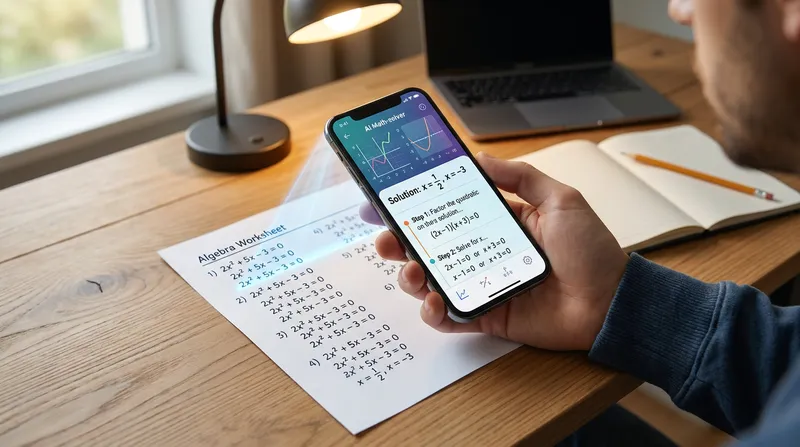
We have all been there. It is 10 PM on a Tuesday, and you are staring at a math worksheet that looks like it is written in an alien language. You pull out your phone to use a photo math solver, but the app misreads your messy handwriting, confusing a plus sign with a letter "t". To make matters worse, your parents are looking over your shoulder, deeply worried that you are just mindlessly copying answers instead of actually learning the material. This fear is incredibly common: parents worry that simply scanning equations sets their children up for failure on future exams, while students are just trying to survive the night without tears.
If this sounds familiar, you are not alone. Math anxiety affects millions of families, and while educational technology is meant to help, it can sometimes add to the stress if not used correctly. This guide will show you exactly how to use a math scanner app to relieve that late-night pressure, avoid frustrating scanning errors, and use step-by-step explanations to genuinely understand the concepts. Let us dive into how you can turn your smartphone into a powerful 24/7 tutor.
Why Every Student Needs a Photo Math Solver (And How to Use It Right)
The familiar late-night homework struggle is a reality for families across the United States. When a student hits a roadblock in algebra or geometry, the resulting frustration can derail an entire evening. A photo math solver is not just a shortcut to the final answer; it is a powerful tool designed to relieve academic stress and provide immediate support when a teacher or tutor is not available.
When used correctly, a math homework helper app builds confidence. It acts as a safety net, allowing students to check their work, find where they made a mistake, and correct their course before they practice the wrong method repeatedly. In this guide, you will learn how to scan math problems accurately, utilize step-by-step math solver features to truly learn, and avoid the common pitfalls that lead to mindless copying.
What is an AI Photo Math Solver?
An AI math picture solver is an application that uses your smartphone camera to read and solve mathematical equations. It relies on a technology called Optical Character Recognition (OCR), which scans the image, identifies the numbers and mathematical symbols, and translates them into a digital format that the artificial intelligence can process.
However, not all educational apps are created equal. There is a massive difference between a simple answer bot (which only gives you the final number) and a true step-by-step math solver. A high-quality tool, like TutorAI, breaks down the logic, showing you exactly how to move from the problem to the solution. It explains the "why" behind every single step, acting as a 24/7 tutor in your pocket. The best apps go even further by tracking which problem types you struggle with most and adapting future practice to close those gaps. This personalized learning feature gives parents visibility into their child's progress without hovering.
Here is a quick breakdown of how these tools compare:
| Feature | Simple Answer Bots | Step-by-Step Solvers (Like TutorAI) |
|---|---|---|
| Final Answer | Yes | Yes |
| Explanation | None | Detailed logic for every step |
| Learning Value | Low (encourages copying) | High (builds true understanding) |
| Parent Features | None | Progress tracking & personalized paths |
To understand more about how these different tools compare and which one is right for your learning style, check out our guide on the Best AI Tutors for Students: Socratic AI vs. Answer Bots for Homework Help. Choosing an app that prioritizes the learning process over just giving answers is the first step toward academic success.

The Try First, Check Later Method: How to Learn (Not Cheat)
Let us address the elephant in the room: the fear of cheating. It is incredibly easy to snap a photo, write down the answer, and close the book. But doing so completely bypasses the learning process. The ultimate study loop for using an AI math problem solver is what educators call the "Try First, Check Later" rule.
According to experts at Mathnasium, the most effective way for students to use AI is to attempt the problem independently first, and then ask the AI to check their reasoning or explain the concept. Here is how you can implement this method tonight:
- Step 1: Attempt the problem on paper. Give it your best effort, even if you only get halfway through the equation.
- Step 2: Identify your roadblock. Pinpoint exactly where you are stuck. Is it factoring the polynomial? Are you unsure how to isolate the variable?
- Step 3: Scan and review. Use your take a picture math solver to scan the problem. Do not look at the final answer yet. Look at the specific step where you got stuck, learn what to do next, and then put the phone away to finish the problem yourself.
For a deeper dive into maintaining academic integrity while using technology, read our article: Can AI Do My Math Homework For Me? How to Use AI Math Solvers to Learn (Not Cheat).
How to Scan Math Problems: A Step-by-Step Guide
Even the best AI is only as good as the picture you feed it. If you have ever felt frustrated because an app gave you the wrong answer, it was likely due to a scanning error. Here is a practical guide to getting the most accurate results when you solve math from images.
Step 1: Prep Your Handwritten Math Problems
When using a handwritten math solver, preparation is key. The AI has to decipher your unique handwriting, which can be tricky if the paper is messy or poorly lit.
- Flatten the paper: Creases and folds can distort the numbers, making a "7" look like a "1".
- Fix the lighting: Avoid heavy shadows cast by your hand or your phone. Use natural light or a bright desk lamp, ensuring the light hits the paper evenly.
- Write clearly: This is the most common point of failure. When writing equations, make sure your plus signs (+) look distinctly different from the letter "t". Ensure your number "5" does not look like an "s", and your number "2" does not look like a "z".
Step 2: Use Your Camera Math Solver to Capture the Equation
How you hold your phone matters just as much as how clearly you write.
- Hold the phone parallel: Do not tilt your phone at an angle. Hold it completely flat and parallel to the desk to avoid warping the image.
- Use the cropping tool: Most math scanner apps have a cropping feature. Use it to isolate a single problem. If the camera captures three different equations at once, the AI will get confused and try to solve them all together. As a bonus, TutorAI keeps your previously solved problems available offline, so a weak Wi-Fi signal at 10 PM will not cut you off from the steps you have already reviewed.
This cropping technique is especially critical when tackling multi-step equations found in AP Calculus & SAT Math prep. If you are studying for high-stakes exams, precision is everything.
Step 3: Analyze the Step-by-Step Breakdown
Getting the correct answer on your screen is not the end of the process; it is the beginning of the learning phase. What you do next determines whether you are actually learning the material.
Research shared by the Drexel University School of Education shows that timely, personalized feedback from educational tools helps students make sense of mathematical ideas and reflect on their thinking. This reflection is essential for building conceptual understanding over time.
To get this benefit, read through each step of the explanation carefully. Write the steps down in your own words on a piece of scratch paper. Compare the AI's method to your original attempt and circle the exact spot where you made a mistake. Did you forget a negative sign? Did you multiply instead of divide? Identifying your specific error ensures you will not make it again on the actual test.
A Parent's Guide to Managing AI Math Solvers at Home
If you are a parent, it is completely normal to have concerns about screen time and academic integrity. You want your child to learn, not just find the easiest way out of doing their homework. However, banning these apps is often counterproductive. Instead, you can turn a potential cheating tool into a collaborative learning experience.
Sit down with your middle schooler and audit their app usage together. Ask them to teach you how they use the app. Request that they explain the step-by-step breakdown of a problem to you out loud. This technique (known as the Feynman Technique) proves that they actually understand the material.
AI tools can actually reduce tears and frustration at the kitchen table by providing the subject-matter expertise that parents might have forgotten, especially with the shifts to Common Core and updated state standards. A systematic review published by the U.S. Department of Education (ERIC) emphasizes that Intelligent Tutoring Systems significantly improve learning outcomes, but shorter interventions without substantial teacher or parent involvement yield smaller effects. Your involvement is crucial.
For more advice on supporting your child through difficult subjects, check out our post on No judgment, infinite patience: How an AI math tutor eases middle school math anxiety.
Avoiding the Cognitive Debt Trap in Mathematics
There is a hidden danger in relying too heavily on technology for homework help: cognitive debt. Cognitive debt occurs when students use shortcuts so frequently that they lose their foundational problem-solving skills. Over time, they become "deskilled" and struggle to perform basic mathematical reasoning without a device in their hand.
To avoid this trap, you must balance app usage with independent practice. For every three problems you solve using an AI math picture solver, challenge yourself to solve one completely on your own, from start to finish, without any digital assistance.
We explore this phenomenon in depth in our article, The AI 'Cognitive Debt' Crisis: Why MIT Warns That Standard Math Solvers Are Deskilling Students, which highlights how researchers warn that over-reliance on standard math solvers can harm long-term retention. A literature review in the International Electronic Journal of Mathematics Education confirms that while AI tools improve student achievement through personalized learning, they must be paired with appropriate strategies to avoid procedural problem solving without conceptual understanding. By setting strict boundaries around when and how you use a math word problem scanner, you can enjoy the benefits of instant help without sacrificing your brain's ability to think critically.
Master Your Math Homework Today
Using an AI photo math solver does not have to be a source of stress or a point of conflict at the kitchen table. By treating the app as an active learning tool rather than a passive shortcut, you can unlock its true potential. Remember these three key takeaways:
- Prep your paper: Write clearly and use good lighting to avoid scanning errors.
- Scan accurately: Hold the phone flat and crop to a single problem.
- Study the steps: Identify your exact mistake to build true understanding.
Remember, the goal is not just to get the homework done; the goal is to understand the math so you can walk into your next exam with absolute confidence. Snap the picture, solve the problem, and most importantly, learn the concept.
Ready to turn homework stress into academic success? Download TutorAI on iOS or Android today and master math on your own schedule.
Note: Every student learns differently. While these strategies are research-backed, results may vary. Adapt these techniques to fit your unique learning style and circumstances.
Frequently Asked Questions
Is using a math scanner app considered cheating?
It depends entirely on how the student uses it. If they only copy the final answer to finish their homework quickly, it is cheating. However, if they use it to check their work and read the step-by-step explanations to understand their mistakes, it is a highly valuable study tool.
What is the best photo math solver for messy handwriting?
Top-tier apps like TutorAI use advanced OCR technology specifically trained to read handwritten notes. To get the best results, always write as clearly as possible, avoid overlapping numbers, and use good lighting when taking the photo.
Can an AI math picture solver help with word problems?
Yes, modern AI tools include a math word problem scanner that can interpret text, extract the necessary variables, and set up the equation before solving it. This is incredibly helpful for students who struggle with translating English sentences into mathematical formulas.
How do I stop my child from just copying answers from a math equation scanner?
Recommend the "Try First, Check Later" rule. Ask your child to show their initial work on paper before they are allowed to scan the problem for help. You can also review their app history together to discuss the concepts they struggled with.
Are camera math solver apps accurate for advanced subjects like Calculus?
Yes, advanced AI solvers are highly accurate for high school and college-level math, including AP Calculus, Trigonometry, and SAT prep. Just ensure the image is clear and the entire problem is captured within the crop frame.