
As a teacher, tutor, or parent, you're on the front lines of an educational revolution. Artificial intelligence is no longer a far-off concept; it's in your classroom, on your students' phones, and deeply woven into the tools they use every day. The feeling of being overwhelmed is understandable. If you're worried AI might replace teachers, you're not alone-but the research shows AI is a tool that makes your irreplaceable human skills even more valuable.
You're looking for a trustworthy guide that goes beyond the constant fear of cheating and offers practical, pedagogy-first strategies for using AI. You need to know how to use it effectively to reduce your workload, support every student, and foster critical thinking, not just why you should be wary of it.
This guide is your answer. We'll move beyond the ban and embrace a new role for you: the Teacher as Co-Pilot. Drawing on guidance from top institutions like the U.S. Department of Education, we'll provide an actionable framework to help you navigate this new terrain with confidence. Let's explore how to use AI ethically and effectively to enhance learning, not replace it.
What is Ethical AI in Education? (It's More Than Just Cheating)
For many educators, the conversation around AI starts and ends with academic integrity. While preventing cheating is important, a truly ethical approach to AI in education is much broader. It's about ensuring that technology is used in a way that is fair, equitable, transparent, and beneficial for all learners.
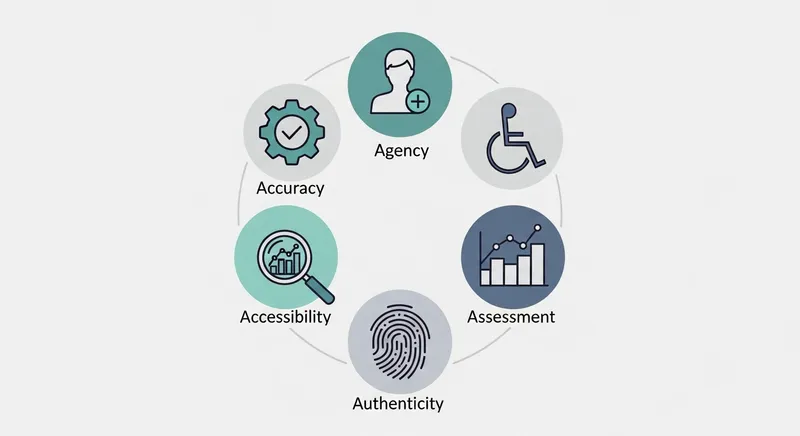
According to in-depth research published in journals like AI and Ethics, the core ethical challenges go deeper, including:
- Privacy Violations: How is student data being collected, used, and protected?
- Algorithmic Bias: Are the AI tools perpetuating or even amplifying existing societal biases related to race, gender, or socioeconomic status?
- Equity and Access: Does every student have equal access to these beneficial tools, or are we widening the digital divide?
- Autonomy: Are we empowering students to think for themselves or creating a dependency on AI for answers?
Global organizations like UNESCO emphasize a human-centered approach, urging that AI should be used to enhance, not diminish, the core principles of education. The goal isn't just to stop students from copying and pasting; it's to create a new generation of critical thinkers who know how to use powerful tools responsibly.
The Teacher as Co-Pilot: A 5-Pillar Framework for Responsible AI
Instead of viewing AI as an adversary, think of it as your co-pilot. Just as a pilot uses autopilot for routine navigation but makes all critical decisions, you'll use AI for time-consuming tasks while maintaining full control over pedagogy and student relationships. It can handle routine tasks and navigate complex data, but you, the teacher, are always in command, focusing on what matters most: your students. This framework, built on five key pillars, provides a practical way to implement this philosophy in your classroom.
Pillar 1: Accuracy & Authenticity (Fighting Misinformation)
Generative AI tools are designed to be convincing, not necessarily truthful. Teaching students to critically evaluate AI-generated content is perhaps the most crucial digital literacy skill of our time. According to Common Sense Media, a majority of students are in schools that lack clear rules on AI, creating a critical need for proactive instruction.
Actionable Tip: Turn AI's weakness into a learning opportunity. Have students use an AI tool to generate a summary of a historical event or a scientific concept. Then, have them fact-check the output against reliable sources, highlighting any errors or biases. This teaches them to treat AI as a brainstorming partner, not an infallible expert.
Pillar 2: Agency (Keeping Humans in the Loop)
The U.S. Department of Education strongly advocates for a "human in the loop" approach, ensuring that educators and students retain control and decision-making power. This means setting clear expectations for when and how AI should be used.
Actionable Tip: Co-create a simple AI usage policy with your students. Define what constitutes helpful use (e.g., generating study questions, explaining a concept in a different way) versus dishonest use (e.g., submitting AI-generated text as their own). Framing it around a Free AI Study System that promotes ethical habits can empower students to make good choices.
Pillar 3: Accessibility (Ensuring AI for All)
AI holds incredible promise for creating more inclusive learning environments, but only if the tools themselves are accessible. When choosing software, prioritize platforms designed to support all learners, including those with disabilities or who need extra help.
Actionable Tip: When vetting an AI tool, ask: Does it have text-to-speech? Is the interface simple and uncluttered? Can it adapt to different learning paces? For example, AI can be a game-changer for differentiated instruction by creating reading materials at multiple Lexile levels from a single source text, a task that would take a teacher hours to do manually. This is especially helpful for busy parents trying to navigate The Parent's Guide to New Math and other complex subjects.
Pillar 4: Assessment (Rethinking How We Measure Learning)
If an assignment can be completed entirely by AI, it might be time to rethink the assignment. As institutions like Harvard University refine their academic integrity policies, the focus is shifting from policing to promoting deeper learning. They clarify that using AI to generate an assignment is a violation, pushing educators to design assessments that AI can't solve alone.
Actionable Tip: Shift assessments to focus on critical evaluation. For example, instead of asking students to write a 500-word essay on photosynthesis, have them use AI to generate one, then create a presentation critiquing it. They would have to explain what the AI got right, what it got wrong, and what crucial context it missed. This assesses their analytical skills, not just their ability to prompt a machine.
Pillar 5: Accountability & Data Privacy
Not all AI tools are created equal, especially when it comes to student privacy. Using free, consumer-grade AI tools in the classroom can be a direct violation of privacy laws like FERPA. The Future of Privacy Forum provides critical guidance on this issue. A key takeaway is that schools cannot require students to use third-party tools that haven't been vetted and licensed by the institution.
Actionable Tip: Stick to institutionally approved tools. Before adopting a new AI platform, ask the provider for their data privacy policy. Never ask students to create accounts on third-party sites using their personal information. Look for tools designed for education that are transparent about how they handle data.
Your AI Quick Start: 3 Things to Do This Week
Ready to get started? Here's a simple action plan for this week:
- Co-create your AI policy: Use the T-chart method described in the FAQ to build guidelines with your students.
- Draft one lesson plan: Ask an AI tool to outline a lesson plan for an upcoming topic. Refine and adapt it to your teaching style.
- Try one approved tool: Explore an AI tool that has been vetted by your school, like TutorAI, to see how it can support student learning.
Practical Strategies for Integrating AI in Your Classroom
Knowing the principles is one thing; applying them is another. Here are three practical, high-impact ways to start using AI in your classroom tomorrow.
1. Reduce Your Workload (Without Sacrificing Quality)
Teacher burnout is a critical issue, and AI can be a powerful ally in reclaiming your time. Research from Stanford University shows that AI can significantly reduce the time teachers spend on administrative tasks, freeing them up for direct student interaction. When you reclaim five hours per week from grading and planning, you can invest that time in one-on-one student conferences or simply avoiding burnout, both of which directly improve student outcomes.
Actionable Tip: Use AI to:
- Draft Lesson Plans: Provide your learning objective, grade level, and standards, and ask AI to generate a draft lesson plan, complete with activities and assessment ideas. You then refine and perfect it.
- Generate Examples: Need 10 unique word problems for a math quiz? Or five different sentence starters for an essay? AI can do that in seconds.
- Write Parent Communications: Draft a class newsletter or an email about an upcoming field trip, then personalize it with your own voice.
2. Supercharge Differentiated Instruction
Meeting the diverse needs of every student in a crowded classroom is one of the biggest challenges in teaching. AI excels at personalization and can be your partner in differentiation, helping you create tailored learning experiences at scale.
Actionable Tip: Use AI to support students who need extra help or an additional challenge. Tools with personalized learning paths, like TutorAI, can identify a student's weak spots and provide targeted practice. This is like giving every student a personal tutor that adapts to their pace, a core principle for Acing STEM. You can also use AI to modify a single text for different reading levels or create tiered assignments with varying levels of complexity.
3. Provide Instant, Constructive Feedback
Timely feedback is essential for learning, but it's impossible to be there for every student 24/7. AI tools can bridge this gap, offering immediate support that helps students get unstuck and learn from their mistakes.
Actionable Tip: Instead of just giving answers, look for tools that explain the process. When a student is stuck on a math problem at home, an AI tool like TutorAI can use photo-based solving to provide not just the solution, but a detailed, step-by-step explanation. This fosters genuine understanding, not dependency. For writing, you can use AI to give students instant feedback on grammar and structure, allowing them to revise their work before submitting it. This approach transforms homework from a performance task into a learning opportunity, a key theme in guides to the best AI homework solvers.
Choosing the Right AI Tools: A Teacher's Checklist
With thousands of AI tools available, choosing the right one can be daunting. Use this checklist to vet potential tools and ensure they align with ethical and pedagogical best practices.
- ✅ Pedagogy First: Does the tool support real learning (e.g., explaining processes, asking questions) or just provide answers?
- ✅ Privacy Protected: Is the tool FERPA-compliant? Is its data policy clear and transparent?
- ✅ Promotes Equity: Is it accessible to all students, including those with disabilities? Is it available on multiple devices?
- ✅ Aligned with Standards: Does the tool support the development of skills outlined in frameworks like the ISTE Standards for Students, which emphasize digital citizenship and critical thinking?
- ✅ Fosters Independence: Does the tool provide support that empowers the student to eventually solve problems on their own?
Look for tools designed for education. While platforms like TutorAI are built on these principles, also consider established tools with AI features like Khan Academy's Khanmigo or integrations within Google Classroom, once they have been approved by your institution. Platforms like TutorAI are designed to create a supportive ecosystem focused on building long-term confidence and understanding, making it one of the Best AI Maths Tutors for 2026.
By using this checklist, you ensure that technology serves your pedagogy, not the other way around.
Your Journey as an AI Co-Pilot Starts Now
Integrating AI into your classroom isn't about becoming a tech expert overnight. It's about taking small, thoughtful steps to leverage these powerful tools in service of your ultimate goal: fostering a vibrant, supportive, and effective learning environment for every student.
By embracing your role as the Teacher as Co-Pilot, you remain in command, using AI to navigate the routine tasks so you can focus on the human connections that are, and always will be, the heart of education. You have the power to model responsible innovation, preparing your students not just for their next test, but for their future.
Ready to see how an ethical AI tool can support your students? TutorAI provides instant, step-by-step homework help that focuses on real learning and builds academic confidence. Get started for free today on iOS and Android.
Frequently Asked Questions
What are the main ethical concerns of using AI in education?
The primary ethical concerns go far beyond cheating. They include: 1) Student Data Privacy, ensuring that personal and educational data is protected and not misused; 2) Algorithmic Bias, where AI systems may perpetuate or amplify existing biases against certain student groups; 3) Equity of Access, making sure that AI tools don't widen the gap between well-resourced and under-resourced students; and 4) Autonomy, ensuring students develop critical thinking skills rather than becoming dependent on AI for answers.
How can I create a simple AI usage policy for my classroom?
Start by collaborating with your students. A simple and effective method is the T-chart. Draw a large 'T' on a whiteboard. Label one column "Appropriate Use (AI as a Co-Pilot)" and the other "Inappropriate Use (AI as the Pilot)." Brainstorm examples for each side. Appropriate uses might include generating ideas, creating study guides, or explaining concepts. Inappropriate uses would include copying text verbatim or using AI to complete an entire assignment without original thought. This collaborative process builds buy-in and clarifies expectations.
How does AI in education impact equity and fairness?
AI can be a double-edged sword for equity. On one hand, it has the potential to democratize access to personalized tutoring and support, providing students in under-resourced schools with tools previously available only to the affluent. On the other hand, if high-quality AI tools are expensive, they can widen the achievement gap. Furthermore, if the algorithms are trained on biased data, they may offer less effective support to students from non-majority backgrounds. Ethical implementation requires schools to prioritize tools that are accessible and have been vetted for bias.
How can AI help me with grading and providing student feedback?
AI can be a significant time-saver for providing feedback. It can instantly check for grammar, spelling, and sentence structure on written assignments, allowing you to focus on higher-level feedback about ideas and arguments. For subjects like math, AI tools like TutorAI can provide instant, step-by-step solutions that help students identify their errors in real-time, rather than waiting days for graded feedback. This frees you from correcting routine calculations and allows you to spend more time on conceptual understanding.
What should I tell parents about how I'm using AI in the classroom?
Be proactive, transparent, and positive. Send a newsletter or email explaining which AI tools you are using and, most importantly, why. Frame it as a way to enhance learning, provide personalized support, and prepare their children for the modern world. Emphasize that you are the 'pilot' and AI is the 'co-pilot.' Reassure them that student data privacy is a top priority and that you are only using school-approved, vetted tools. Providing links to resources like Common Sense Media can also help them feel more informed and comfortable.