
The Digital SAT is Here: What's New and Why Strategy Matters
Picture this: You're a few weeks away from the Digital SAT, and someone mentions that the test adapts based on your answers. Cue the anxiety, right? We get it. The shift from paper to a digital format has brought a lot of questions. But here's the good news: this new test is designed to be more relevant and less of a marathon.
The biggest change is that it's a "multistage adaptive" test. According to the College Board, the organization that creates the SAT, your performance on the first part of a section determines the difficulty of the second part. This means that how you take the test is just as important as what you study.
Knowing the right strategies can help you walk into the exam feeling confident, calm, and in control. This guide will give you practical, actionable Study Tips focused on mastering the digital format to help you perform your best on test day.
9 Actionable Digital SAT Strategies to Master the Exam
Let's dive into the core strategies that will help you conquer the digital SAT. Think of these as your toolkit for success. By practicing them, you'll not only improve your score but also reduce test-day jitters.
1. Master the Built-In Tools Before Test Day
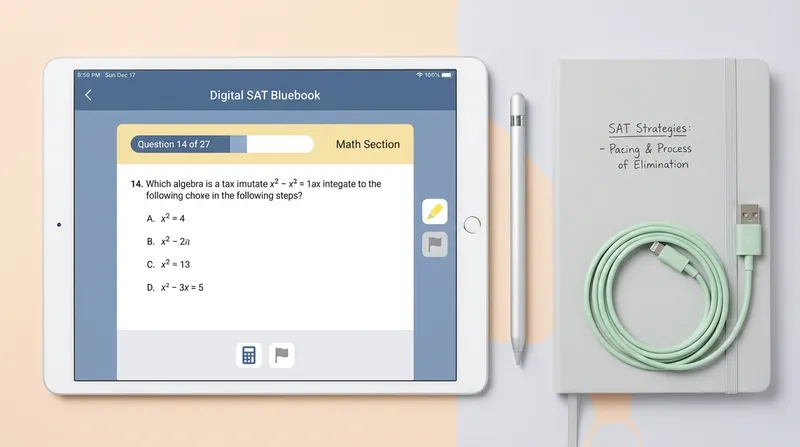
The digital SAT platform comes with several handy tools designed to help you. Don't wait until test day to learn them! Practice using them in the Bluebook app until they feel like second nature.
- Highlighter: Use this to mark key information in reading passages or important values in math problems.
- Answer Eliminator: As The Princeton Review recommends, the process of elimination is a powerful strategy. The digital tool lets you visibly cross out answers you know are wrong, helping you focus.
- Flag for Review: This is your best friend for time management. If a question seems too hard or time-consuming, flag it and come back later. Don't let one tough question derail your whole section.
2. Demystify the 'Multistage Adaptive' Format
That phrase "multistage adaptive" can sound intimidating, but it's simpler than you think. As test prep experts at PrepScholar explain, the test adapts between modules, not after every question. Here's how to handle it:
- If the second module feels harder: Congratulations! That means you did well on the first one and are on track for a higher score.
- If the second module feels easier: Don't panic! It doesn't mean you've failed. As experts at Kaplan advise, your only job is to answer each question to the best of your ability. The adaptive format works in the background—you just focus on getting questions right, one at a time. Trust your preparation.
3. Perfect Your Digital SAT Time Management
With the digital SAT, you have a built-in timer on your screen—use it to your advantage! The College Board's official blog notes that you have, on average, about 1 minute and 11 seconds per Reading and Writing question and about 1 minute and 35 seconds per Math question.
If you can't solve a question in under a minute, flag it and move on. This "Flag and Return" strategy prevents you from getting bogged down. You can secure points on easier questions and then return to the flagged ones if you have time.
4. Use Process of Elimination on Screen
We mentioned the answer eliminator tool, but it's worth its own tip because it's so powerful. Every time you eliminate a wrong answer, you increase your odds of guessing correctly. If you can cross out just two choices, your chance of guessing correctly jumps from 25% to 50%. Make it a habit: on every multiple-choice question, your first goal should be to find and eliminate the obvious wrong answers.
5. Leverage the Desmos Calculator on Every Math Question
This is a game-changer. The digital SAT includes a powerful Desmos graphing calculator that is available for the entire math section. You should get familiar with it by practicing at the official Desmos testing site.
Here's how it can help you save time and check your work:
- Graphing Equations: Instantly visualize a function to find its x-intercepts or vertex.
- Solving Systems of Equations: Graph two lines and find their intersection point.
- Testing Values: Quickly plug numbers into complex expressions to see if they work.
Always have the calculator open and ready. Even for problems that seem simple, it can help you avoid small errors and verify your answers, especially for tricky algebra word problems.
6. Adapt Your Reading Strategy for Short Passages
The digital SAT's Reading and Writing section features many short passages, each with only one question. Use this to your advantage by reading the question first. This tells you exactly what to look for, turning the task into a search-and-find mission rather than a deep reading comprehension test. For even more efficiency, experts at Marks Education suggest you might want to tackle the grammar-based questions first, as they are often quicker to solve.
7. Don't Skip the Official Bluebook Practice Tests
There is no better way to prepare than by using the College Board's official Bluebook app. This is the only platform that gives you a true adaptive experience. Take at least two full-length practice tests to build your stamina and refine your strategies. After each test, use the results to identify your weak spots. You can then use free resources like Khan Academy, the official prep partner for the SAT, or an AI Tutor to get targeted practice.
8. Know What to Do the Night Before the SAT
The night before the test is not for cramming—it's for preparing your mind and your gear. Follow this simple checklist:
- Tech Check: Fully charge your testing device and make sure Bluebook is downloaded and updated.
- Logistics: Pack your bag with your device, charger, a valid ID, and some snacks and water for the break.
- Rest Up: Your brain works better after a full night of sleep. Aim for 8-10 hours.
- Relax: Do something calming that you enjoy. Watch a movie, read a book, or listen to music. Trust in your preparation.
Parents: This is your moment to shine as the calm, organized support system! A simple question like, "Is your laptop charged and ready for tomorrow?" can prevent a major test-day crisis.
9. Build Confidence with Targeted Practice
Confidence is your most powerful tool on test day. It comes from knowing you've prepared effectively. After you take a practice test, you'll know exactly which types of problems give you trouble. Instead of feeling discouraged, see this as your roadmap for what to practice.
If you get stuck on a specific math problem at 11 PM, don't just give up. Use a tool like Tutor AI to snap a picture and get a step-by-step explanation, 24/7. Understanding why you got it wrong is the key to getting it right next time. This kind of targeted math help turns weaknesses into strengths, one problem at a time.
Your Path to Digital SAT Success
Mastering the Digital SAT is about combining smart preparation with strategic test-taking. By practicing with the built-in tools, understanding the adaptive format, and managing your time effectively, you can walk into the exam room with the confidence to achieve your best score.
Ready to master these strategies with personalized practice? Get instant, step-by-step explanations for any problem with Tutor AI. Download it for free on iOS and Android to turn your practice into progress.
Note: Every student learns differently. While these strategies are research-backed, results may vary. Adapt these techniques to fit your unique learning style and circumstances.
Frequently Asked Questions
Is the digital SAT easier than the paper SAT?
It isn't necessarily easier, but it is different in ways many students prefer. The test is significantly shorter (about two hours instead of three), and the multistage adaptive format means the questions are tailored to your performance level. While the core skills tested are the same, the digital experience is often seen as less exhausting.
Can I go back to questions in a module?
Yes, you absolutely can. Within a single module of either the Reading and Writing or Math section, you have the freedom to move back and forth between questions. This is why the 'flag for review' tool is so valuable—you can skip a hard question, answer others, and return to the flagged one before time runs out for that module. However, once you complete a module, you cannot go back to it.
What happens if I guess on the digital SAT?
There is no penalty for guessing on the digital SAT. Because of this, you should answer every single question, even if you have to make a blind guess. Your score is based on the number of questions you answer correctly, so leaving an answer blank is a missed opportunity. Always use the process of elimination tool to improve your guessing odds.
How does the adaptive scoring work?
Your performance on the first module of each section determines which version of the second module you receive—one that is either higher-scoring or lower-scoring. Your final score is calculated based on a combination of how many questions you answer correctly across both modules and the overall difficulty level of the questions you were presented with. This is why performing well on the first module is critical for unlocking your highest potential score.
What is the best way to practice for the digital SAT?
The most effective practice comes from using the official resources. Start by taking full-length adaptive practice tests in the College Board's Bluebook app to simulate the real experience. Analyze your results to pinpoint specific skills or question types you struggle with. Then, use targeted resources like the official SAT practice on Khan Academy or an AI-powered learning app to drill those specific areas until you build confidence.